Goodwill Accounting on Teams

A while ago, I was working at a very early stage start-up with two friends.  It was just the three of us, but both of them were in San Francisco, while I was living in Seattle.   Every month or so, I’d travel down to stay in San Francisco for a few days so that we could catch up and spend some real-world time together.  It was during this time that I noticed the phenomenon I call “goodwill accounting”.

Naturally, starting a company is stressful for anyone, and we were no different.  The odd thing I noticed was that the longer it was since I was down in SF, the more irritated I’d get with my teammates over little things.  Then, when I would go down to SF, I’d feel a lot closer to my friends again, and it would be a lot easier to deal with the myriad little disagreements you naturally have to sort out when building a company.

What I noticed was that it was really the outside-of-work time which really made the improvement, and it started to occur to me that those times were filled with good feelings: often as a strong contrast to the stress of the work.  We’d go out to eat together, chat about things we share outside of work, laugh, joke around, get out an enjoy the city… all sorts of things.  And those events would fill up a kind of emotional reservoir of friendship and trust between us.  Or, to put it another way, we’d make a “deposit” in a “goodwill account”.

Then, when we got back to work, the natural rigors of the work would start to “withdraw” from that account.  Each disagreement, though perfectly natural and necessary for the business, would count as a “withdrawal”.  So long as we kept making “deposits”, things would generally be fine, and we could sustain the stress of building a business together.  It was only when we let the account drain off that our “checks” would start to “bounce”, and we’d start to have unpleasant disagreements and ill-feeling.

As things went along, I started actively thinking about my relationship with my two friend along these lines quite explicitly, and I’d start to deliberately arrange to make “deposits” in the accounts I had with each of them as much as possible.  Sadly, sometimes the rigors of founding a company would result in “bounced checks”, but it helped a lot to have this metaphor for understanding what was going on and a way to correct the situation.

✧✧✧

The lesson here is to keep in mind your “goodwill account” with the people around you.  This is part of the one-on-one relationship you have with each person you spend time with (whether a colleague, spouse, child, or friend).  Any time you do fun things, share something special, or enjoy time spent together, you make “deposits”.  Any time you disagree, get on each other’s nerves, or cause one another bad feelings, you make a “withdrawal”.  For some relationships, it’s easy to keep the books balanced, but for other relationships (especially work relationships), you have to be more deliberate.  When you notice a relationship starting to go south, consider whether you’re “in the red” with that person, and what you can do to add something back into the account.
Recipes: Chicken Tikka Masala

One of my other hobbies is cooking, and I’ve been collecting recipes for a while now.  As I try new recipes, I re-write the ones I like into my own online cookbook.  Naturally, being a software engineer, I created a little website to keep them organized.  Of course, having the source code on my hard drive, I was just one command-line command away from having a version-controlled repository using git.  From there, it was an easy step to publish it to GitHub, and from there to activate the GitHub Pages feature to make it a public website.

Besides being intensely geeky, this has actually been super helpful!  I’ve found myself at  a friend’s house where we decide we want to cook something together, or I’ve wanted to share a recipe with someone.  This makes it super easy to do so.  So… I’m sharing my latest addition with you!

http://andrewminer.github.io/recipes/chicken-tikka-masala

I didn’t actually make up the recipe (you can see the source at the bottom), but I have adjusted it a bit to suit my own taste, and I re-arranged it to fit into my cookbook’s design.  Enjoy!

Building a Board & Weekly Progress Reports

In starting out a self-funded company, I didn’t just get a board by virtue of taking on an investor, but I still found that I really wanted a way to get feedback and advice from more experienced people I know and trust.

To that end, I started asking friends and colleagues if they’d be willing to receive a weekly progress report from me, and occasionally field a few questions. Having worked with a number of generous and savvy people, I quickly got about two dozen people on my list.

Starting from my first week “on the job”, I sent an email to this group roughly¹ once a week detailing how things were going.  This email has three broad sections:

  • A narrative description of the big issue(s) I dealt with that week. This might be describing some engineering issue, a new feature, or how some recent customer interviews went.  If applicable, it contained pictures and/or videos of recent progress.
  • A bullet points list in three sections: what I accomplished, what I’m still working on, and what’s next
  • An evaluation of my own emotional state (optimistic? disheartened? frustrated? elated?) and a brief outline of why and how I got that way.

Including the center section was especially helpful as it forced me to get very clear about past/present/future each week.  It also gave me an impetus to really complete things so I can include them in the accomplishments section, and thereby gives me a sense of accountability.

When I sent these emails out, I almost always got back a few responses which range from actual solutions to issues I was having, to simple words of encouragement (which were still much appreciated!).


¹ except when nothing much had happened, and I was just working through the same plan as the previous week

Redis: Storing time-series data in a sorted set

Along with a regular Set data type, Redis also has a Sorted Set data type. Like a regular set, you can add unique items to the set using the ZADD and fetch them back again using various other commands.

The main difference with a sorted set is that when you add an item, you must also provide a “score” which is used to determine the item’s order in the set. The score can be any integer, and can be completely unrelated to both the key and value being stored.

It is important to note that a sorted set is still a set! If you add identical values multiple times, the item will only appear once using the last score assigned. For this reason, you can’t store arbitrary data in a set unless you can guarantee each value is unique (i.e., it is either a unique identifier or is a data blob containing a unique identifier).

In my case, I wanted to store time-series data in a sorted set, but, since I can be pretty sure that the values won’t be unique, I can’t use a plain sorted set (i.e., if the value on Monday is 10, and the value on Wednesday is 10, then the Monday value gets clobbered since a set only stores unique values). However, I did figure out a handy work-around using Redis’s built-in scripting capabilities.

Why use a sorted set?

The very handy thing about sorted sets is that you can use a single command to fetch all the values within a certain time frame. Using ZADD, you store a given value in a key with a score which represents its sort order. For time-series data, the key can be anything you like, the score should be the time of the event (as an integer), and the value should contain the data.

Once the data is loaded, the ZRANGEBYSCORE command can fetch a sorted list of values whose scores fall within a certain range.

But what about uniqueness?

The problem is that a sorted set is still a set, and it won’t sort non-unique values (even if they have different scores). Let’s take an example. Suppose you’re measure the temperature outside your home each day. Let’s further suppose that on Monday, the temperature was 52°. Your command would be:

ZADD temp:house 1421308800000 52

On Tuesday, perhaps it was a bit warmer:

ZADD temp:house 1421395200000 65

But, on Wednesday, it got colder again:

ZADD temp:house 1421481600000 52

Now, we’ve got problems. Since uniqueness only pertains to the value, regardless of the score, you just changed the timestamp of 52° to Wednesday, thus deleting the data recorded on Monday.

How to create uniqueness

To work around this issue of uniqueness, I decided to add the timestamp to the data as well as the score. One could certainly do this on the client side (e.g., by encoding both temperature and timestamp in JSON), but I wanted to be able to access that data from within Redis’s scripting environment for other reasons.

It turns out, the Redis scripting language was also the key to encoding the data as I needed. To start, I used the LOAD command to store a LUA script:

local value = cmsgpack.pack({ARGV[2], ARGV[1]})
redis.call('zadd', KEYS[1], ARGV[1], value)
return redis.status_reply('ok')

The result of the command is to load the script and return an identifier you can later use to call it (which happens to be the SHA of the script). This uses the cmsgpack built-in library to create a very efficient binary-encoded representation of the two pieces of data.

Now, instead of just using ZADD to store my values, I invoke my script with the EVALSHA command:

EVALSHA <sha> 1 temp:house 1421481600000 52

Now, instead of storing 52° as my value, I’ve got a binary record combines 52 and 1421481600000, and therefore is unique to that moment in time.

Getting the data back again

In my case, I wanted to use the data by performing calculations on it in another LUA script. Without getting into too much detail, I basically just used the LOAD and EVALSHA commands to execute a LUA script containing:

for k, v in ipairs(redis.call('zrangebyscore', KEYS[1], ARGV[1], ARGV[2])) do
    local value = tonumber(cmsgpack.unpack(v)[1])

In this example, ARGV represents the arguments passed to the EVALSHA command, KEYS is the list of keys passed to the command, redis.call is a function used to run regular Redis command from within the LUA script, and cmsgpack.unpack takes the value and returns an array of the fields it contains.

From there, my LUA script goes to work!

Gathering early-stage product feedback

Early in the process of figuring out my product, I conducted a series of customer interviews. I started the business to build a product I personally wanted, so I had a pretty good idea about how I would use it, but I really wanted to know whether my experience was common with anyone else.

To that end, I did some brainstorming on the types of people who would be at all likely to use my product (not necessarily just those I was aiming for to start with), and then went through my LinkedIn connections for colleagues who fit into those categories. From an initial list of close to 30 people, I narrowed it down to six people who gave me a very widely diverse group in terms of professional training, day-to-day responsibilities, and industry.

Next, I wrote down a set of questions I wanted to ask each person. The overall structure was to start by asking questions to see if the person felt the pain my product attempts to solve, proceed into questions which try to discover how they solve it today, and finally to find out how well they like that solution.

At this point, I stopped with my questions, and give the pitch for my product. At the time, I didn’t have a live demo or even mock-ups, but I definitely would have used them if I had them. I let the interviewee ask as many questions as they liked, and then proceeded to the next batch of questions:

  • Does my product sound like something they could use?
  • What would be the biggest obstacle to adopting it?
  • What could I do to make adoption as easy as possible?
  • How much would you expect to have to pay for this product?

The information I received from these interviews was highly informative, and while it didn’t change my core vision for my product, it definitely changed a lot of my thinking about the details, and how to get it to my customers.

Building my own Workbench

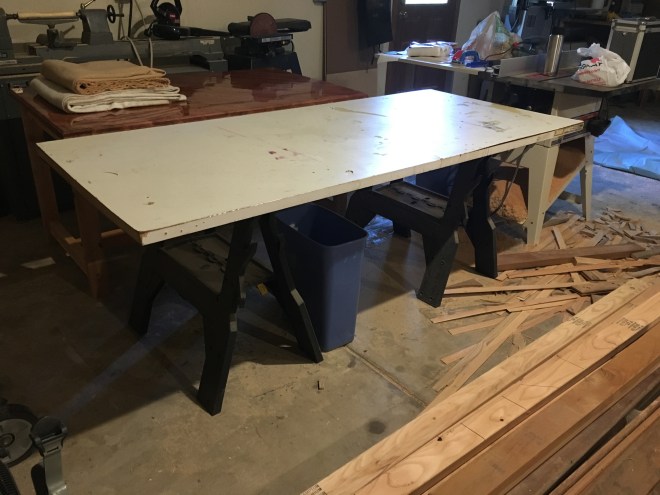
When I first set up my wood-shop, I was using an old door thrown across two sawhorses as my work bench:

IMG_0829.JPG

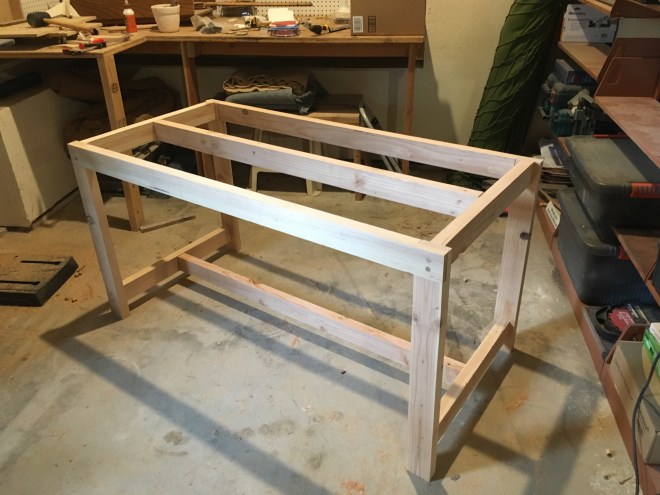
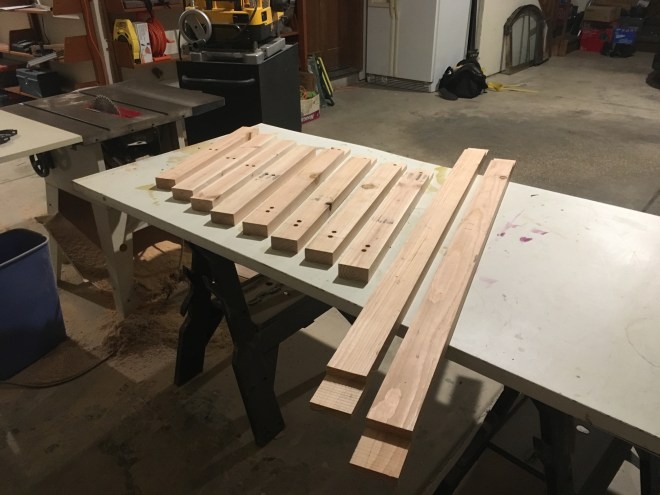
It was wobbly, the door tended to slide off the horses, and you really couldn’t attach a vise (or even a clamp) to it to hold down a piece of work.  So, I decided I needed an upgrade.  After drawing up some plans, I got to work cutting out the initial stock for the legs, rails, and other components for the frame.

IMG_0800.JPG

Then came joining all the pieces together.  As a challenge for myself, I decided I wouldn’t use any metal fasteners anywhere in the whole table.  However, I’m still more-or-less a novice at wood working, so I decided to go with a few simple joints, and use dowels as a surrogate for metal fasteners.

IMG_0803.JPG

For the table top, I picked some nice ¾” plywood I had from another project, and cut it to be just a little larger than the frame (to give myself somewhere to place clamps).  To fasten this to the frame, I cut holes at a 45° angle, and drove dowels in with some glue.  Since each set of dowels were driven in at 90° to one another, this prevents any movement of the surface in any direction.

IMG_0805.JPG

I also had some beautiful oak flooring left over from a different project, so I decided to put it to good use here.  The first step was just sorting through all the scraps to make sure I had enough pieces of sufficient size to actually cover the entire table.

IMG_0810.JPG

At this point, they’re only clamped into place to test the fit, so the next step was to actually glue everything down and trim the edges to match the plywood surface underneath.

IMG_0813.JPG

Next, I decided I wanted a super durable finish which would protect against dropped tools, heavy pieces of work, clamp marks, and the other abuses a workbench would suffer.  So, I did a bunch of research and decided to go with a liquid epoxy finish.

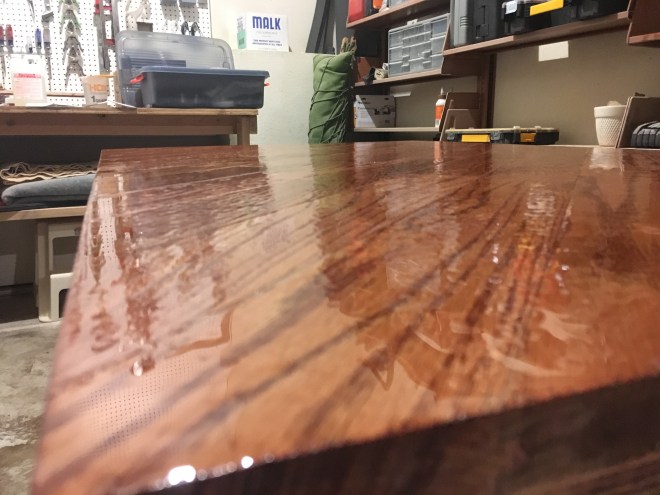
The stuff is fiendishly difficult to work with.  Following some advice I found in the internet, I allowed the first coat to drip over the sides of the table-top as I spread it out… big mistake.  Even with a drop-cloth, it made a huge mess, and was both slippery and sticky underfoot.  Even worse, I didn’t make enough in my first batch, so I wound up with lots of little “pockets” as it cooled and the surface tension pulled it away from those areas.

IMG_0818.JPG

It’s hard to actually see the effect from a distance (thankfully!), but here’s a closer view so you can really see what I’m talking about:

IMG_0819.JPG

For the second coat, I disregarded the earlier advice, and built up a little dam around the edges using some very sturdy duct tape.

IMG_0820.JPG

With the second coat on, things looked a lot better!  Still a few “pockets” and a few areas where the grain of the wood allowed air bubbles to continually be re-introduced to the epoxy, but these are very minor in the overall surface.

IMG_0823.JPG

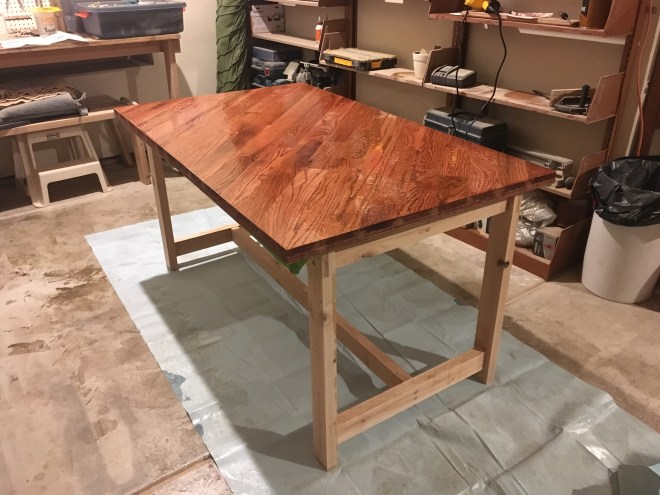
At this point, there was only applying some polyurethane to the frame to be done.

IMG_0828.JPG

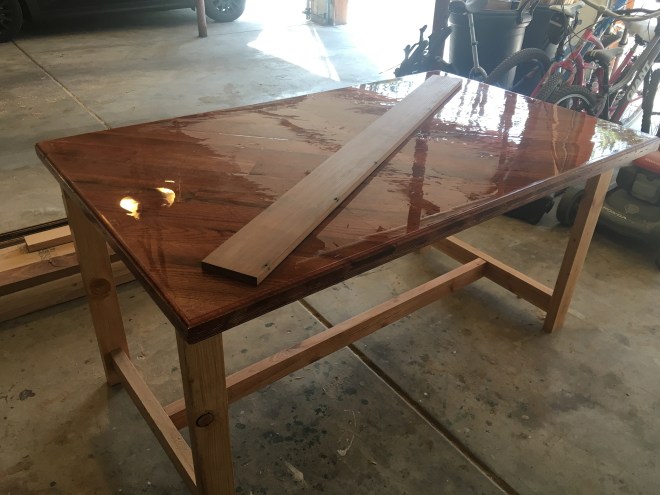
And, then, we have the final result.

IMG_0834.JPG

Flexibility with the Pomodoro Technique

When I was a solo founder, I found I needed a way to structure those vast stretches of unstructured time to ensure I balanced getting done everything I needed to with switching between various tasks, and avoiding burning myself out.  I found it worked best to manage my work hours during the day using a variation of the Pomodoro Technique.

For those unfamiliar with it, this technique has you break down your working time into 25 minute sprints where you focus exclusively on work (i.e., no bathroom breaks, no getting coffee, no checking Facebook, etc.) with 5 minute breaks in between.  During the breaks, you can do whatever you like, and every fourth break (i.e., every two hours), you take a 20 minute break.

I find this immensely useful, but I’ve needed to make some changes for it to work best for me.  First, I use 30 minute work periods and 7 minute breaks.  I like the 30 minute time because it makes it easy to figure out how much time I’ve worked in a given day.  I find a good pace for me is between 4-6 hours (or 8 to 12 pomodori) each day.  Second, I use 7 minute breaks because that’s how long it takes me to brew a pot of coffee.

However, there are plenty of times where my day just doesn’t break down this way.  It could be that I have meetings to attend, or I’m working on something very intense and I feel I need a longer break, or whatever.  In that case, I still hold myself to the discipline of being focused during each pomodoro, but I allow myself longer breaks in between.  I also keep track of how many pomodori I’ve completed during the day, and hold myself to getting to at least my minimum number, but no more than my maximum (to avoid pushing myself too hard).

I’ve found this pattern works extremely well for me.  30 minutes on, 7 minutes off.  Take longer breaks as needed.  Set a minimum and maximum number of work periods for a day, and stick to it.

Staying Productive Working from Home

When I was a solo founder, and I would tell people what I do, their first response would nearly always be: “Oh, I could never do that.  I’d goof off all day.  How do you keep from getting distracted?”  The answer I generally give is that I’ve developed a routine which works for me, and I’ve made it a habit to stick to it.  When you think about it, it’s really not that different from what most people do in their 9–5 jobs, except as a solo founder, you need to be disciplined enough to set up your habits yourself.  And, now that I’m back to working at a company again, I find that I really benefit from all of these things: especially when I’m working from home.

However, it would be a lie to say it wasn’t hard at first.  There are a few things which changed when I started both working from home, and working for myself.


I needed an office

This is for two reasons.  First, and most obvious, is that I needed a quiet place to work and talk with my colleagues.  It just isn’t reasonable to expect even the most accommodating family to keep silent all day while you work.

Second, I needed a gentle way to let my family know when I was working and didn’t want to be disturbed.  It’s hard on everyone if you’re constantly saying: “Not now, I’m working” all the time: especially for kids.  Even my wife, though with the best of intentions, found it irresistible to ask for my attention far too often for my ability to concentrate.

Having a separate room with a door gave me a clear signal that I’m working now.  It made it possible for me, then, to come out and interact with the rest of the family when it was a good time for a break.  It also gives me a clear distinction between being “at work” or “at home”, which is indescribably necessary when you spend nearly 100% of your time in the same building.


I needed a schedule

Of course, long hours are startups are proverbial.  However, that’s not my problem.  Quite the opposite, in fact.  Without a schedule, I find that I feel relentlessly increasing pressure to work more and more hours.  And, after a few weeks or months, I completely burn out and lose all motivation for two weeks.

For me, the schedule is about being deliberate about the use of my time.  If I grant myself a certain amount of working hours for a given day, then I can feel good about having finished what I could reasonable do and giving myself a break.  On the other hand, on days where I’m distracted (e.g., a dentist appointment), I know when I need to work a bit later to get the job done.


I needed a organizational system

It feels like, as a solo founder, my job jumps back and forth between long stretches where I’m pounding the keyboard building my product, and briefer stretches where I’ve got ten thousand little things to check off (e.g., incorporation papers, creating bank accounts, finding an accountant, etc.).

I’ve long been a strong proponent of the Getting Things Done methodology and the Things or OmniFocus products as a way to implement it.

Suffice to say, having a place to record all those little things is invaluable for two main reasons.  First, it’s a way to keep me from forgetting them.  Whenever something pops into my head which need to get done, I stick it in Things.  Second, it it’s a way to let me forget them.  Once they’re in my system, I absolutely trust that I’ll get back to them when appropriate, and I can simply stop thinking about them.  This makes it possible to focus on something else without getting stressed when there are too many things to keep track of all at once.

✧✧✧

Between those three things, I feel like my job kept the same structure built into it that most people’s jobs do. I get up, eat breakfast, go to work, eat lunch, do some more work, and then go home. I just didn’t have to commute.

Applying GTD to Email

Every time I start to tell people that I use Getting Things Done (GTD), I almost immediately get some variant of the question:

What do you recommend for someone with 2,500 emails in inbox???

Better spam filtering?

Seriously, though… I’d recommend you apply the GTD workflow to the individual emails. Start by deciding how far back any email could possibly still be relevant and archive everything older than that.

Next, read each remaining email quickly and simply decide whether any action is required.  If you take 10 seconds on each email just to make that one decision, you’ll be able to identify all the actionable emails in a few hours.  Each time you find an actionable email, use whatever your email system offers to collect them into a place you know is for actionable things.  Personally, I prefer using the “flag” feature in my email program, but just dumping them into a special folder would world just as well.  The details aren’t important: just be sure to get them out of your inbox, but marked in such a way that you can find them again later.  Archive anything which isn’t actionable.  Your inbox should now be completely empty.

Of course, that doesn’t mean you’re finished.  Next, go back through the actionable emails and just answer anything which requires a quick reply or some similarly quick and simple action¹.  In other words: apply the 2-minute rule from GTD to each email.

What’s left represents your actual work.  Set aside some time every day to work down the list of items and knock them out.  At this point, I’d be surprised if you had more than a a few dozen emails remaining, so it shouldn’t be too daunting.

Going forward, adopt the same process to all incoming email so that you wind up with an empty inbox several times a day.  Of course, while your inbox will be empty, you’ll still have those actionable emails set aside.  So, continue to set aside some time each day to respond to actionable emails.

✧✧✧

The advantages of this approach are the same as applying GTD in general:

  • you are constantly aware of high-priority items
  • your attention isn’t needlessly yanked around all the time
  • emails you need to respond to don’t get buried by new, incoming email


I’ve applied this technique for both personal and work email for years now, and I get my email inboxes empty several times a day.  I’ve decided to respond to work emails about twice a day, and to personal emails about twice a week.  However, for urgent matters, I’m still able to respond instantly.  And, of course, it’s easy to adjust my reply times as I see fit, instead of being yanked around by my email instead.


¹ For anything from a real company with an “unsubscribe” link, use it!  Unless you really value the content, nearly all reputable companies will respect an unsubscribe request, and it will dramatically curtail the amount of email you need to sift through on a daily basis.

Sending Cold Emails

This is part 2 of a series on interviewing.  Check here for part 1 on setting up an interviewing team.

✧✧✧

At a rough guess, I get about 4–5 recruiting emails every week.  Sometimes more, sometimes less.  I only bother to even say “no” to perhaps 1 in 100.  The others go straight to the trash: often unread.  For the benefit of all my recruiter friends, I’d like to explain why.

First, I should mention that I’m a software engineer with roughly 20 years experience.  In that time, I’ve worked up and down the technology stack from web to mobile to back-end to dev-ops: you name it.  I’ve also worked for companies from IBM to a freshly-minted startup.  So, I imagine I’ve gotten on a lot of lists.


Getting it Wrong

The common thread in the 99% of emails I don’t answer is that they’re really just spam.  They obviously take no time to pitch me on why the job fits my interests, talents, or would be better than the job I currently have.  The worst offenders are the bulk emails which invite me to peruse a “jobs” page and apply.  Slightly less obnoxious are the “we saw your resume and think you’d be a good fit…” emails. However, they all focus on what the company wants: not what I might want.  Fire and forget may be a good tactic for filling some positions, but you’re never going to pull a qualified senior person out of their current company that way.


Getting it Right

The tiny fraction of emails I do answer have at least one of the following traits:

  • they come from the hiring manager / founder
  • they clearly demonstrate some specific knowledge about me
  • they clearly tell me why I—me in particular—would enjoy the work
  • they clearly reference that this is a referral from someone I’ve worked with


An Example

One email I recall getting recently was from Matt Lott, the co-founder of CodeCombat: a startup which is trying to help kids learn coding by making a (really cool) game out of it.  He nailed nearly every point on my check-list. Here’s the actual text:

Hi Andrew,

Fellow co-founder here. I checked out Crafting Guide – kudos on
building a really cool guide to everything Minecraft-related :). I
also read on your LinkedIn profile that you enjoy mentoring others so
I thought I’d reach out. Our “World of Warcraft”-inspired game teaches
kids how to become programmers; to climb between levels, students
write code to navigate mazes and defeat savage monsters. More than
20,000 teachers currently use CodeCombat, and our investors include
Andreessen Horowitz and YC.

So far, we’ve built a popular single-player game, and we have many
cool challenges on the horizon – like building real-time multiplayer
mechanics and revamping our graphics engine. With your experience, I
thought you’d be interested in leading these initiatives.

If you’re interested in helping kids learn, I’d love to chat. How
about a phone call or coffee next week?

Matt Lott
CTO, CodeCombat

First, this is clearly coming from the hiring manager / co-founder.  This means that someone who has many other responsibilities thinks there’s a good enough chance that we’d want to work together that it’s worth his time to contact me in person.

Second, Matt clearly did his homework here.  He obviously read my LinkedIn profile carefully; he noted that we’re both co-founders, and that I mention enjoying teaching.  He also found the gaming-related hobby site I made, and he obviously spent some time figuring out what it is all about.

Third, while a big chunk of the email is clearly pretty general-purpose, he starts by calling out the why my specific interests—teaching & gaming—would lead me to being interested in working on their product—which is all about teaching through gaming.  Then, he gracefully transitions from the more personalized part to the less personalized part.

In fact, the only point he didn’t hit was mentioning this as a referral, but hey… sometimes that’s just not the case.  Still, 3 out of 4 is better than 99.99% of recruiting emails I get.

And, for the record, while I didn’t accept Matt’s offer for coffee, we did have a very nice email exchange.  Of greater importance, though, is that if I heard back from him under different circumstances, I’d be happy to renew the acquaintance.

✧✧✧

I don’t need to tell anyone that there’s a lot more open headcount for senior people than there are actual people willing to join your company.  I also don’t need to tell anyone that, in general, we are well-paid, and have our choice of jobs.  Naturally, that implies that everything in recruiting is backwards compared to other more junior positions.

If I could make every recruiter understand one thing about recruiting senior-level professionals, it would be: you are in sales.  I’m a prospect, and you’re pitching a product to me.  You need to learn enough about me to understand what will motivate me to buy, and then sell it to me.  You’ve got one email to convince me that you’ve made an effort to pitch me on something that I actually want.  Don’t blow it on cheap form letters or junk mail.